

To fully immerse yourself in the action of Battlefield 6, a game poised to revitalize the first-person shooter genre, you first need to ensure it launches correctly. Many players attempting to start the game have encountered an error requiring `Secure Boot` to be enabled, preventing them from joining the fray.
Secure Boot is a fundamental security feature configured within your computer`s BIOS (Basic Input/Output System) that enhances your system`s startup protection. Battlefield 6 mandates this feature to be active for the game to run. To avoid simply viewing an error message instead of commanding a tank, follow these steps to activate it.
While experienced PC builders might already be familiar with enabling Secure Boot, for many casual gamers, navigating the BIOS can seem as intimidating as a complex hacking operation. Fear not, as we`ve prepared a straightforward guide to help you enable Secure Boot easily.
Enabling Secure Boot: A Step-by-Step Guide
Accessing your BIOS typically involves pressing a specific key—such as F2, F10, F12, or Delete—repeatedly during your PC`s startup, as this key varies by motherboard manufacturer. However, Windows 11 offers a more convenient method to enter the BIOS directly from the running operating system:
- Navigate to your Start menu and select the power icon.
- Press and hold the Shift key, then click `Restart.` This action will take your computer to the Windows Recovery Environment.
- From the blue recovery screen, proceed by selecting `Troubleshoot,` followed by `Advanced Options,` then `UEFI Firmware Settings,` and finally, `Restart.`
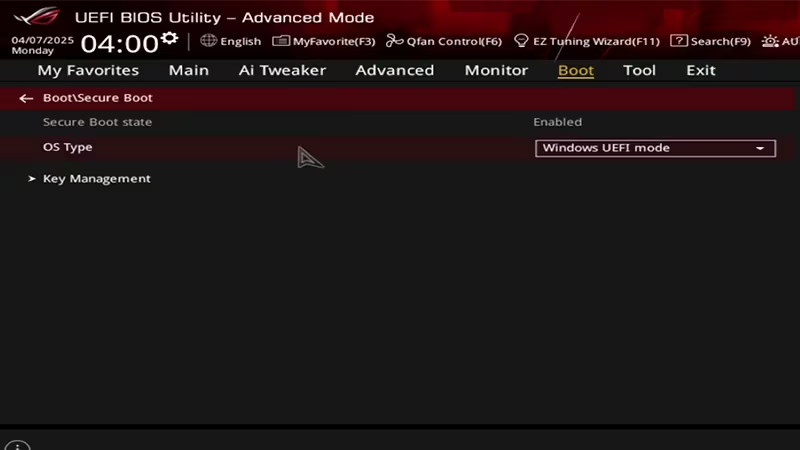
Once inside the BIOS interface—which may vary visually depending on your system—your goal is to locate either the `Security` or `Boot` menu. In some cases, both options might be present. Within one of these sections, you`ll find the `Secure Boot` option. Ensure this setting is switched to Enabled.
After enabling Secure Boot, save your changes and exit the BIOS to allow your system to boot into Windows 11. Typically, an `Exit` option is available within the BIOS, or you can often use Esc or F10 to save and exit. With Secure Boot now active, you`re ready to jump into the explosive action of Battlefield 6.